pjbondi
August 25, 2025, 4:18pm
1
Hello Plone volunteers:
I've been using *nix since the early 90s, but this is my first time using docker and Plone.
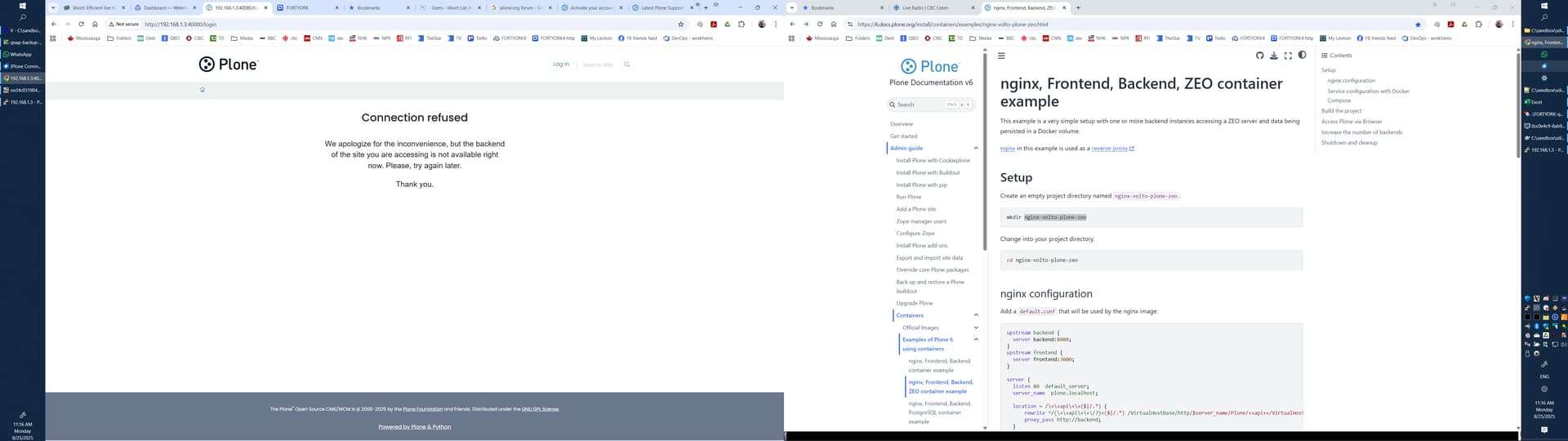
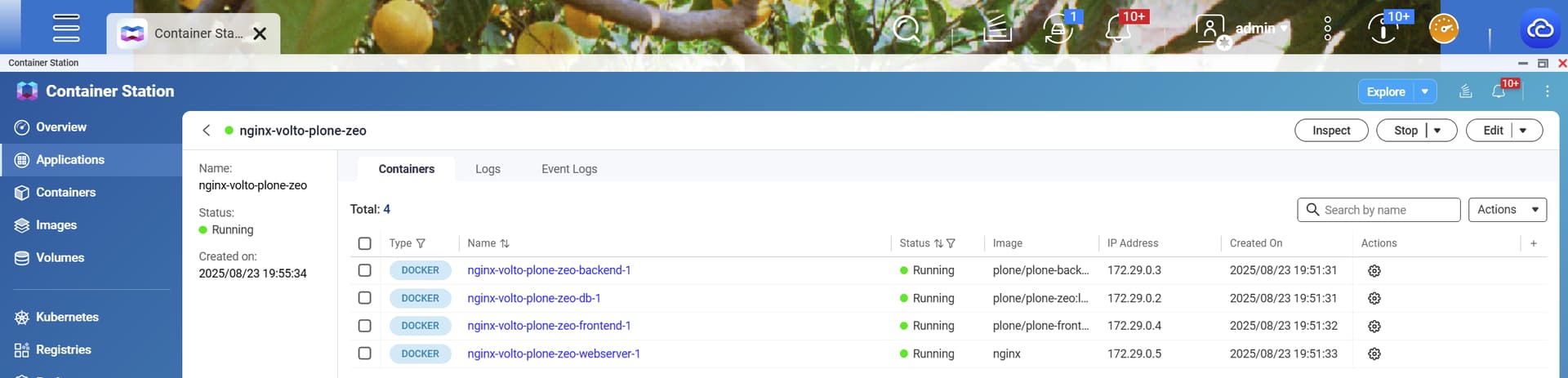
I've successfully stood up nginx-volto-plone-zeo on QNAP based on nginx, Frontend, Backend, ZEO container example — Plone Documentation v6
But I'm getting:
I had to change the ports for backend and webserver:
upstream backend {
  server backend:48080;
}
upstream frontend {
  server frontend:3000;
}

server {
  listen 40080  default_server;
  server_name  plone.localhost;

  location ~ /\+\+api\+\+($|/.*) {
      rewrite ^/(\+\+api\+\+\/?)+($|/.*) /VirtualHostBase/http/$server_name/Plone/++api++/VirtualHostRoot/$2 break;
      proxy_pass http://backend;
  }

  location ~ / {
      location ~* \.(js|jsx|css|less|swf|eot|ttf|otf|woff|woff2)$ {
          add_header Cache-Control "public";
          expires +1y;
          proxy_pass http://frontend;
      }
      location ~* static.*\.(ico|jpg|jpeg|png|gif|svg)$ {
          add_header Cache-Control "public";
          expires +1y;
          proxy_pass http://frontend;
      }

      proxy_set_header        Host $host;
      proxy_set_header        X-Real-IP $remote_addr;
      proxy_set_header        X-Forwarded-For $proxy_add_x_forwarded_for;
      proxy_set_header        X-Forwarded-Proto $scheme;
      proxy_redirect http:// https://;
      proxy_pass http://frontend;
  }
}
services:

  webserver:
    image: nginx
    volumes:
      - ./default.conf
    depends_on:
      - backend
      - frontend
    ports:
    - "40080:40080"

  frontend:
    image: plone/plone-frontend:latest
    environment:
      RAZZLE_INTERNAL_API_PATH: http://backend:48080/Plone
    ports:
    - "3000:3000"
    depends_on:
      - backend

  backend:
    image: plone/plone-backend:6.1
    environment:
      SITE: Plone
      ZEO_ADDRESS: db:8100
      ZEO_SHARED_BLOB_DIR: on   # otherwise the backend will create its own blob storage
    volumes:
      - data:/data              # the backend and database need access to the same volume
    ports:
    - "48080:48080"
    depends_on:
      - db

  db:
    image: plone/plone-zeo:latest
    restart: always
    volumes:
      - data:/data
    ports:
    - "8100:8100"

volumes:
  data: {}
What should be my next step for diagnosis?
polyester
August 26, 2025, 10:43am
2
I do not know QNAP, but if it is possible to get a shell there, you will get more information from manually running “docker compose up” (without the -d) there.
My guesses for candidates:
assuming you had good reasons to change the ports, there may be a block against certain port ranges. Try changing the db ports to 48100 (and the corresponding entry for ZEO_ADDRESS). (It seems the 3000 port is not blocked as you get something at least)
the second candidate is always file permissions. You could explicitly set where the data is stored by specifying the volume, something like :volumes: data: driver: local driver_opts: type: none o: bind device: /opt/plone_data
but then the user that runs the docker has to have write rights in /opt/plone_data or where you prefer to put it. You can explicitly instruct the “db” container to run with a specific userID, I always find it’s safer to use numeric ID’s there, something like user: 1000:1000 (but, as said, use the numeric id of the user that runs the docker compose on the host)
unsword
August 27, 2025, 6:07pm
3
I'm by no means an expert here, but I have a similar setup running Plone with Volto behind nginx using containers and seem to recall running into a similar issue when using the config example verbatim.
Here’s a snippet of my default.conf file for nginx:
location ~ /\+\+api\+\+($|/.*) {
      rewrite ^/\+\+api\+\+($|/.*) /VirtualHostBase/https/$server_name/Plone/++api++/VirtualHostRoot/$1 break;
  # ** set the protocol correctly in the rewrite ---^^^^^
  # ** must be https if site is using https !!
      proxy_pass http://backend;
  }
1 Like
avoinea
September 4, 2025, 11:20am
4
@pjbondi I could spot a few things in your docker compose mapping ports, but changing the nginx port was the real challenge. Thus here are the updated files:
default.conf
upstream backend {
  server backend:8080;
}
upstream frontend {
  server frontend:3000;
}

server {
  listen 40080  default_server;
  server_name localhost;

  location ~ /\+\+api\+\+($|/.*) {
      rewrite ^/(\+\+api\+\+\/?)+($|/.*) /VirtualHostBase/http/$server_name:40080/Plone/++api++/VirtualHostRoot/$2 break;
      proxy_pass http://backend;
  }

  location ~ / {
      location ~* \.(js|jsx|css|less|swf|eot|ttf|otf|woff|woff2)$ {
          add_header Cache-Control "public";
          expires +1y;
          proxy_pass http://frontend;
      }
      location ~* static.*\.(ico|jpg|jpeg|png|gif|svg)$ {
          add_header Cache-Control "public";
          expires +1y;
          proxy_pass http://frontend;
      }

      proxy_set_header        Host $host;
      proxy_set_header        X-Real-IP $remote_addr;
      proxy_set_header        X-Forwarded-For $proxy_add_x_forwarded_for;
      proxy_set_header        X-Forwarded-Proto $scheme;
      proxy_redirect http:// https://;
      proxy_pass http://frontend;
  }
}
docker-compose.yml
services:

  webserver:
    image: nginx
    volumes:
      - ./default.conf:/etc/nginx/conf.d/default.conf
    depends_on:
      - backend
      - frontend
    ports:
    - "40080:40080"

  frontend:
    image: plone/plone-frontend:latest
    environment:
      RAZZLE_API_PATH: http://localhost:40080/
      RAZZLE_INTERNAL_API_PATH: http://backend:8080/Plone
    ports:
    - "3000:3000"
    depends_on:
      - backend

  backend:
    image: plone/plone-backend:6.1
    environment:
      SITE: Plone
      ZEO_ADDRESS: db:8100
      ZEO_SHARED_BLOB_DIR: on   # otherwise the backend will create its own blob storage
    volumes:
      - data:/data              # the backend and database need access to the same volume
    ports:
    - "48080:8080"
    depends_on:
      - db

  db:
    image: plone/plone-zeo:latest
    restart: always
    volumes:
      - data:/data
    ports:
    - "8100:8100"

volumes:
  data: {}
avoinea
September 4, 2025, 11:40am
5
Now, if you are in the cloud/virtual machine (not on localhost), then things get even more complicated security reasons , you shouldn’t expose services ports, other than Nginx.
Thus, here is an example with IP (replace 192.168.1.129 with your IP )
default.conf
upstream backend {
  server backend:8080;
}
upstream frontend {
  server frontend:3000;
}

server {
  listen 40080  default_server;
  server_name 192.168.1.129;

  location ~ /\+\+api\+\+($|/.*) {
      rewrite ^/(\+\+api\+\+\/?)+($|/.*) /VirtualHostBase/http/$server_name:40080/Plone/++api++/VirtualHostRoot/$2 break;
      proxy_pass http://backend;
  }

  location ~ / {
      location ~* \.(js|jsx|css|less|swf|eot|ttf|otf|woff|woff2)$ {
          add_header Cache-Control "public";
          expires +1y;
          proxy_pass http://frontend;
      }
      location ~* static.*\.(ico|jpg|jpeg|png|gif|svg)$ {
          add_header Cache-Control "public";
          expires +1y;
          proxy_pass http://frontend;
      }

      proxy_set_header        Host $host;
      proxy_set_header        X-Real-IP $remote_addr;
      proxy_set_header        X-Forwarded-For $proxy_add_x_forwarded_for;
      proxy_set_header        X-Forwarded-Proto $scheme;
      proxy_redirect http:// https://;
      proxy_pass http://frontend;
  }
}
docker-compose.yml
services:

  webserver:
    image: nginx
    volumes:
      - ./default.conf:/etc/nginx/conf.d/default.conf
    depends_on:
      - backend
      - frontend
    ports:
    - "40080:40080"

  frontend:
    image: plone/plone-frontend:latest
    environment:
      RAZZLE_API_PATH: http://192.168.1.129:40080
      RAZZLE_INTERNAL_API_PATH: http://backend:8080/Plone
    depends_on:
      - backend

  backend:
    image: plone/plone-backend:6.1
    environment:
      CORS_ALLOW_ORIGIN: "http://192.168.1.129:40080"
      SITE: Plone
      ZEO_ADDRESS: db:8100
      ZEO_SHARED_BLOB_DIR: on   # otherwise the backend will create its own blob storage
    volumes:
      - data:/data              # the backend and database need access to the same volume
    depends_on:
      - db

  db:
    image: plone/plone-zeo:latest
    restart: always
    volumes:
      - data:/data

volumes:
  data: {}
mtrebron
September 5, 2025, 10:33am
6
Hi @pjbondi what a cool idea! Thanks for sharing here.
pjbondi
September 7, 2025, 11:00pm
7
Hello @avoinea and thank you for your ideas so far.
I do not know what diagnostics to provide. This is what I got:
[~] # uname -a
Linux FORTYORK 5.10.60-qnap #1 SMP Tue Jul 15 04:16:24 CST 2025 x86_64 GNU/Linux
[~] # docker ps
CONTAINER ID IMAGE COMMAND CREATED STATUS PORTS NAMES
5de20858397e nginx "/docker-entrypoint.â¦" 2 weeks ago Up 7 minutes 80/tcp, 0.0.0.0:40080->40080/tcp nginx-volto-plone-zeo-webserver-1
161e39810bf3 plone/plone-frontend:latest "pnpm start:prod" 2 weeks ago Up 11 minutes (healthy) 0.0.0.0:3000->3000/tcp nginx-volto-plone-zeo-frontend-1
d80d1644a8a0 plone/plone-backend:6.1 "/app/docker-entrypoâ¦" 2 weeks ago Up 12 minutes (healthy) 8080/tcp, 0.0.0.0:48080->48080/tcp nginx-volto-plone-zeo-backend-1
ae2540980075 plone/plone-zeo:latest "/app/start-zeo.sh" 2 weeks ago Up 13 minutes 0.0.0.0:8100->8100/tcp nginx-volto-plone-zeo-db-1
33e5d8141025 iib0011/omni-tools:latest "/docker-entrypoint.â¦" 4 weeks ago Up 2 weeks 0.0.0.0:32768->80/tcp omni-tools-1
[~] # docker logs ae2540980075 --since "2025-09-07"
=======================================================================================
Starting ZEO on port 8100
=======================================================================================
[~] # docker logs d80d1644a8a0 --tail 25
127.0.0.1 - - [07/Sep/2025:22:48:13 +0000] "GET /ok HTTP/1.1" 200 2 "-" "Wget"
127.0.0.1 - - [07/Sep/2025:22:48:23 +0000] "GET /ok HTTP/1.1" 200 2 "-" "Wget"
127.0.0.1 - - [07/Sep/2025:22:48:33 +0000] "GET /ok HTTP/1.1" 200 2 "-" "Wget"
127.0.0.1 - - [07/Sep/2025:22:48:43 +0000] "GET /ok HTTP/1.1" 200 2 "-" "Wget"
127.0.0.1 - - [07/Sep/2025:22:48:53 +0000] "GET /ok HTTP/1.1" 200 2 "-" "Wget"
127.0.0.1 - - [07/Sep/2025:22:49:03 +0000] "GET /ok HTTP/1.1" 200 2 "-" "Wget"
127.0.0.1 - - [07/Sep/2025:22:49:14 +0000] "GET /ok HTTP/1.1" 200 2 "-" "Wget"
127.0.0.1 - - [07/Sep/2025:22:49:24 +0000] "GET /ok HTTP/1.1" 200 2 "-" "Wget"
127.0.0.1 - - [07/Sep/2025:22:49:34 +0000] "GET /ok HTTP/1.1" 200 2 "-" "Wget"
127.0.0.1 - - [07/Sep/2025:22:49:44 +0000] "GET /ok HTTP/1.1" 200 2 "-" "Wget"
127.0.0.1 - - [07/Sep/2025:22:49:54 +0000] "GET /ok HTTP/1.1" 200 2 "-" "Wget"
127.0.0.1 - - [07/Sep/2025:22:50:04 +0000] "GET /ok HTTP/1.1" 200 2 "-" "Wget"
127.0.0.1 - - [07/Sep/2025:22:50:14 +0000] "GET /ok HTTP/1.1" 200 2 "-" "Wget"
127.0.0.1 - - [07/Sep/2025:22:50:25 +0000] "GET /ok HTTP/1.1" 200 2 "-" "Wget"
127.0.0.1 - - [07/Sep/2025:22:50:35 +0000] "GET /ok HTTP/1.1" 200 2 "-" "Wget"
127.0.0.1 - - [07/Sep/2025:22:50:45 +0000] "GET /ok HTTP/1.1" 200 2 "-" "Wget"
127.0.0.1 - - [07/Sep/2025:22:50:55 +0000] "GET /ok HTTP/1.1" 200 2 "-" "Wget"
127.0.0.1 - - [07/Sep/2025:22:51:05 +0000] "GET /ok HTTP/1.1" 200 2 "-" "Wget"
127.0.0.1 - - [07/Sep/2025:22:51:15 +0000] "GET /ok HTTP/1.1" 200 2 "-" "Wget"
127.0.0.1 - - [07/Sep/2025:22:51:25 +0000] "GET /ok HTTP/1.1" 200 2 "-" "Wget"
127.0.0.1 - - [07/Sep/2025:22:51:36 +0000] "GET /ok HTTP/1.1" 200 2 "-" "Wget"
127.0.0.1 - - [07/Sep/2025:22:51:46 +0000] "GET /ok HTTP/1.1" 200 2 "-" "Wget"
127.0.0.1 - - [07/Sep/2025:22:51:56 +0000] "GET /ok HTTP/1.1" 200 2 "-" "Wget"
127.0.0.1 - - [07/Sep/2025:22:52:06 +0000] "GET /ok HTTP/1.1" 200 2 "-" "Wget"
127.0.0.1 - - [07/Sep/2025:22:52:16 +0000] "GET /ok HTTP/1.1" 200 2 "-" "Wget"
[~] # docker logs 161e39810bf3 --since "2025-09-07"
âELIFECYCLEâ Command failed.
/app/core/packages/volto:
âERR_PNPM_RECURSIVE_RUN_FIRST_FAILâ @plone/volto@18.22.0 start:prod: `NODE_ENV=production node build/server.js`
Command failed with signal "SIGTERM"
> project-dev@1.0.0-alpha.0 start:prod /app
> pnpm --filter @plone/volto start:prod
> @plone/volto@18.22.0 start:prod /app/core/packages/volto
> NODE_ENV=production node build/server.js
API server (API_PATH) is set to:
Proxying API requests from http://localhost:3000/++api++ to http://backend:48080/Plone
ð Volto started at 0.0.0.0:3000 ð
[~] #
[~] # curl -iI http://127.0.0.1:8100
curl: (1) Received HTTP/0.9 when not allowed
[~] # curl -iI http://127.0.0.1:8080
HTTP/1.1 200 OK
Date: Sun, 07 Sep 2025 23:06:04 GMT
Server:
X-Frame-Options: SAMEORIGIN
Content-Security-Policy: script-src 'self' 'unsafe-inline' 'unsafe-eval' ; object-src 'self' ; worker-src 'self' blob:
Content-type: text/html; charset=UTF-8
Last-modified: Mon, 14 Jul 2025 21:48:35 GMT
Accept-Ranges: bytes
Content-length: 580
X-XSS-Protection: 1; mode=block
X-Content-Type-Options: nosniff
[~] # curl -iI http://192.168.1.3:3000
HTTP/1.1 200 OK
Content-Type: text/html; charset=utf-8
Content-Length: 0
ETag: W/"0-2jmj7l5rSw0yVb/vlWAYkK/YBwk"
Date: Sun, 07 Sep 2025 23:06:14 GMT
Connection: keep-alive
Keep-Alive: timeout=5
[~] # curl -iI http://127.0.0.1:80
HTTP/1.1 403 Forbidden
Date: Sun, 07 Sep 2025 23:06:27 GMT
Server: Apache
X-Frame-Options: SAMEORIGIN
Content-Type: text/html; charset=iso-8859-1
I’m not able to post screen capture. Here’s copy, paste of http ://192.168.1.3:40080/login. Same as before.
Connection refused We apologize for the inconvenience, but the backend of the site you are accessing is not available right now. Please, try again later.
Thank you.