pigeonflight
April 4, 2019, 11:29pm
1
Is there a TTW way to include one of the common plone vocabularies in Dexterity.
<model xmlns:form="http://namespaces.plone.org/supermodel/form" xmlns:i18n="http://xml.zope.org/namespaces/i18n" xmlns:lingua="http://namespaces.plone.org/supermodel/lingua" xmlns:marshal="http://namespaces.plone.org/supermodel/marshal" xmlns:security="http://namespaces.plone.org/supermodel/security" xmlns:users="http://namespaces.plone.org/supermodel/users" xmlns="http://namespaces.plone.org/supermodel/schema">
  <schema>
    <field name="group" type="zope.schema.Choice">
      <source>plone.principalsource.Group</source>
    </field>
  </schema>
</model>
erral
April 5, 2019, 5:41am
2
If you want to show vocabulary values in a choice field, you have to use the 'vocabulary' tag:
  <field name="system_type" type="zope.schema.Choice">
    <title i18n:translate="">System Type</title>
    <description i18n:translate="">System Type of this solution</description>
    <vocabulary>plone.principalsource.Group</vocabulary>
    <default></default>
    <required>True</required>
    <readonly>False</readonly>
  </field>
And if you want it to be a multiple selection list with a checkbox field you need to use a "Set" with the relevant widget information:
  <field name="load_type" type="zope.schema.Set" form:widget="z3c.form.browser.checkbox.CheckBoxFieldWidget">
    <title i18n:translate="">Load type</title>
    <description i18n:translate="">Load type used in this project</description>
    <value_type type="zope.schema.Choice">
      <vocabulary>plone.principalsource.Group</vocabulary>
    </value_type>
    <required>False</required>
  </field>
2 Likes
mtrebron
February 25, 2026, 12:06am
3
Apologies for reviving this very old thread. How are defaults set in this widget?
I have tried playing with the <default /> element as well as the individual option values (name, selected, checked and other variations).
In this case I am using an EasyForm, not sure if that makes a difference.
<field name="include_extra_columns" type="zope.schema.Set" easyform:css_class="col-6 fieldgroup group-4 form-switch" easyform:serverSide="False" easyform:THidden="False">
  <default/>
  <description>Wähle hier die Spalten die du zusätzlich im Ubersicht zeigen möchtest.</description>
  <required>False</required>
  <title>Zusätzliche Spalten einblenden</title>
  <value_type type="zope.schema.Choice">
    <values>
     <element key="invoice_total_net">Nettosumme Wert</element>
     <element key="invoice_total_gross">Brutto Endbetrag</element>
     <element key="first_order_date">Erste Bestelldatum</element>
     <element key="last_order_date">Letzte Bestelldatum</element>
    </values>
  </value_type>
  <form:widget type="z3c.form.browser.checkbox.CheckBoxFieldWidget"/>
</field>
1letter
February 25, 2026, 7:24am
4
quick check on https://classic.demo.plone.org/ with dexterity ct schema editor. it works.
<?xml version='1.0' encoding='utf8'?>
<model xmlns:i18n="http://xml.zope.org/namespaces/i18n" xmlns:form="http://namespaces.plone.org/supermodel/form" xmlns:security="http://namespaces.plone.org/supermodel/security" xmlns:marshal="http://namespaces.plone.org/supermodel/marshal" xmlns:indexer="http://namespaces.plone.org/supermodel/indexer" xmlns:users="http://namespaces.plone.org/supermodel/users" xmlns:lingua="http://namespaces.plone.org/supermodel/lingua" xmlns:easyform="http://namespaces.plone.org/supermodel/easyform" xmlns="http://namespaces.plone.org/supermodel/schema">
  <schema>
    <field name="myfield" type="zope.schema.Int">
      <description/>
      <default>
      12
      </default>
      <max>23</max>
      <min>10</min>
      <title>myfield</title>
    </field>
    <field name="myfiedl2" type="zope.schema.Choice">
      <description/>
      <title>myfiedl2</title>
      <values>
        <element>1</element>
        <element>2</element>
        <element>3</element>
      </values>
    </field>
  </schema>
</model>
But a field is not a widget
mtrebron
February 25, 2026, 10:00am
5
For a RadioFieldWidget yes.
    <field name="report_handler" type="zope.schema.Choice" easyform:css_class="col-6 fieldgroup group-6 align-self-start" easyform:serverSide="False" easyform:THidden="False">
      <default>01_bi_download</default>
      <description>Wähle einen Ausgabeformat</description>
      <title>Ausgabe</title>
      <values>
        <element key="01_bi_download">CSV Herunterladen</element>
        <element key="02_bi_view">Daten Anzeigen</element>
      </values>
      <form:widget type="z3c.form.browser.radio.RadioFieldWidget"/>
    </field>
But for a CheckboxFieldWidget something along the lines of <default>invoice_sum_net,invoice_sum_gross</default> does not unfortunately.
1letter
February 25, 2026, 10:54am
6
this works for dexterity contenttypes:
<field name="checkboxtest" type="zope.schema.Set">
      <form:widget type="z3c.form.browser.checkbox.CheckBoxFieldWidget"/>
      <default>
          <element>sum1</element>
          <element>sum4</element>
      </default>
      <description/>
      <required>False</required>
      <title>checkboxtest</title>
      <value_type type="zope.schema.Choice">
        <values>
          <element>sum1</element>
          <element>sum2</element>
          <element>sum3</element>
          <element>sum4</element>
        </values>
      </value_type>
</field>
1 Like
mtrebron
February 25, 2026, 11:17am
7
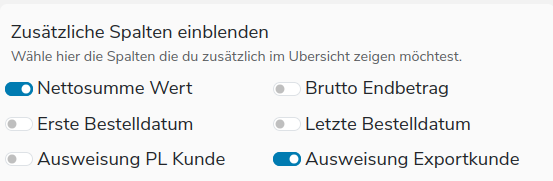
Yes! Thank you @1letter , I probably tried that structure, but never thought of adding the key as the value
      <field name="include_extra_columns" type="zope.schema.Set" easyform:css_class="col-6 fieldgroup group-4 form-switch" easyform:serverSide="False" easyform:THidden="False">
        <default>
          <element>invoice_sum_net</element>
          <element>is_export_customer</element>
        </default>
        <description>Wähle hier die Spalten die du zusätzlich im Ubersicht zeigen möchtest.</description>
        <required>False</required>
        <title>Zusätzliche Spalten einblenden</title>
        <value_type type="zope.schema.Choice">
          <values>
            <element key="invoice_sum_net">Nettosumme Wert</element>
            <element key="invoice_sum_gross">Brutto Endbetrag</element>
            <element key="first_order_date">Erste Bestelldatum</element>
            <element key="last_order_date">Letzte Bestelldatum</element>
            <element key="is_pl_customer">Ausweisung PL Kunde</element>
            <element key="is_export_customer">Ausweisung Exportkunde</element>
          </values>
        </value_type>
        <form:widget type="z3c.form.browser.checkbox.CheckBoxFieldWidget"/>
      </field>