This page appears to be broken and I'm not sure what exactly it should do. You can see the issue by going to demo.plone.org and putting some content in the Pending state. If you also add a Review Portlet you will see a link to Full Review List, or just go to demo.plone.org
Despite having checkboxes for each item, there are no buttons by default. This is because it is looking for actions in the folder_buttons section. If you have a migrated site you will get these, but a new 6 site does not have this category created. The only button that appears to work on migrated 5 sites is the Change Workflow one. Cut/copy/paste/delete have actions string:folder_copy:method (etc) and return a 404.
I think this form should probably not rely on folder_buttons, or those actions should be created in a default 6 site. Is there even a valid action for cut/copy/paste/delete we can change too?
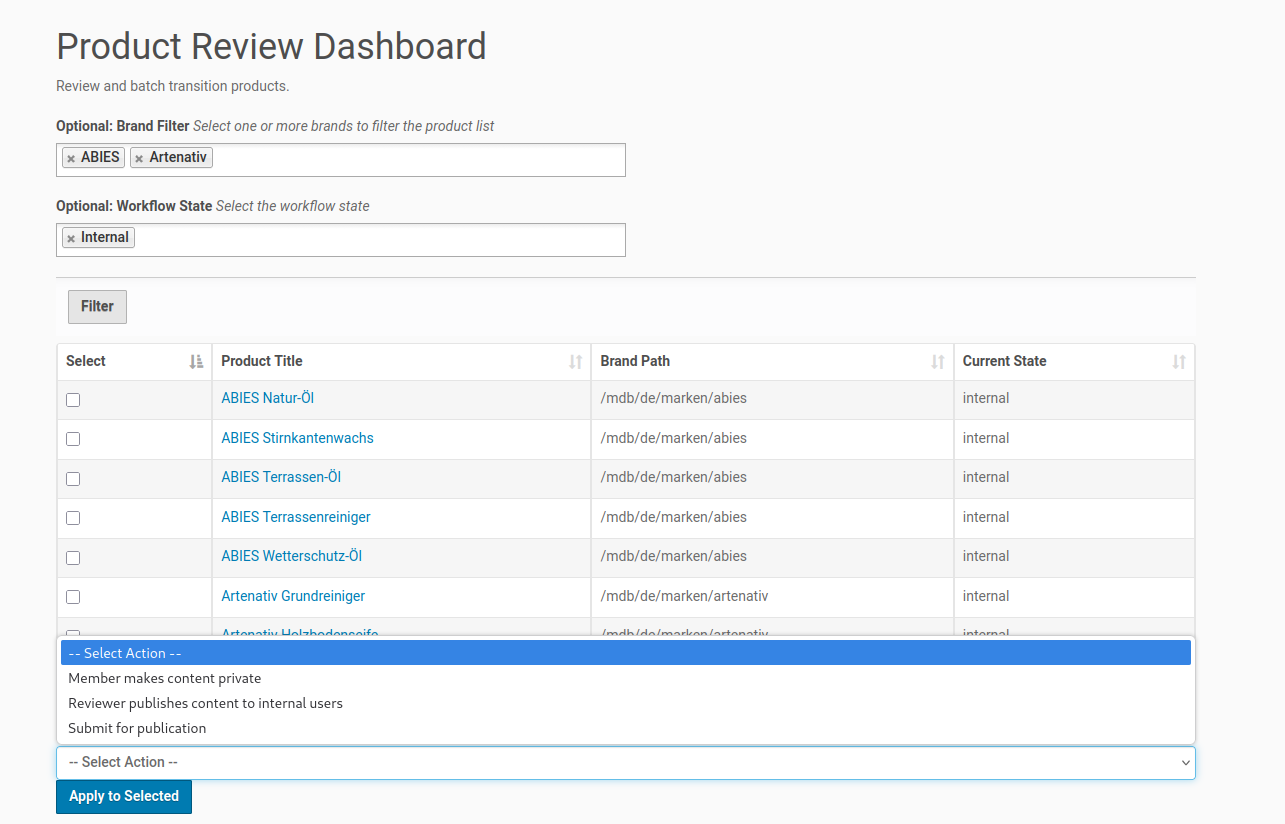
I ran into this in my 5.1 and 5.2 sites, where I needed a new DCWorkflow and a way to bulk review my content. After unsuccessfully trying to patch Products.CMFPlone.WorkflowTool listActions / listActionInfos I ended up vibe coding a dashboard with help from zai-org/GLM-5.2-FP8 · Hugging Face
Turns out, I discovered a reusable pattern for my dashboards.
Maybe this is of help to someone... Use a named vocabulary as a filter.
(Edit: added screenshot at bottom.)
./browser/dashboard_product_review.py

# -*- coding: utf-8 -*-
import logging

from plone import api
from plone.app.z3cform.widget import AjaxSelectFieldWidget
from plone.autoform import directives
from plone.autoform.form import AutoExtensibleForm
from Products.Five.browser.pagetemplatefile import ViewPageTemplateFile
from z3c.form import button
from z3c.form import form
from zope import schema
from zope.interface import Interface

log = logging.getLogger(__name__)


class IDashboardViewForm(Interface):
    """Schema for the filter form"""

    brand_path = schema.Choice(
        title=u"Optional: Brand Filter",
        description=u"Select a brand to filter the product list",
        vocabulary='mdb_theme.BrandPathsVocabulary',
        required=False,
    )
    directives.widget('brand_path', AjaxSelectFieldWidget)


class DashboardView(AutoExtensibleForm, form.Form):
    """A hybrid view: z3c.form for filter, standard HTML for batch table"""

    schema = IDashboardViewForm
    ignoreContext = True
    label = u"Product Review Dashboard"
    description = u"Review and batch transition products."

    # Use a custom template so we can inject the table below the form
    template = ViewPageTemplateFile('templates/dashboard_product_review.pt')

    def update(self):
        """Intercept the batch action POST before z3c.form takes over"""
        if 'apply' in self.request.form:
            self.handle_batch_action()

        super(DashboardView, self).update()

    def handle_batch_action(self):
        """Process the selected UIDs and apply the workflow transition"""

        selected_uids = self.request.form.get('selected_uids', [])
        workflow_action = self.request.form.get('workflow_action')

        if not selected_uids:
            self.status = u"Please select at least one product."
            return

        if not workflow_action:
            self.status = u"Please select a workflow transition."
            return

        count = 0
        errors = 0

        for uid in selected_uids:
            obj = api.content.get(UID=uid)
            if obj:
                try:
                    api.content.transition(obj=obj, transition=workflow_action)
                    count += 1
                except Exception as e:
                    log.error(u"Transition failed for %s: %s" % (obj.absolute_url(), e))
                    errors += 1

        self.status = u"Processed %s products. Errors: %s" % (count, errors)

    @button.buttonAndHandler(u'Filter', name='filter')
    def handleFilter(self, action):
        """Handle the filter button click"""
        data, errors = self.extractData()
        if errors:
            self.status = self.formErrorsMessage
            return
        # The form will re-render, and get_products() will read the request.

    def get_products(self):
        """Query the catalog for products to display"""
        # The AjaxSelectFieldWidget stores the value in the request under this key
        brand_path = self.request.form.get('form.widgets.brand_path')

        # Handle the case where AjaxSelect returns a list
        if isinstance(brand_path, list):
            brand_path = brand_path[0] if brand_path else None

        catalog = api.portal.get_tool('portal_catalog')
        query = {
            'portal_type': 'produkte',
            'review_state': ['internal', 'pending'],
            'sort_on': 'sortable_title',
        }

        if brand_path and brand_path != '--NOVALUE--':
            query['kundenname_verweis'] = brand_path

        brains = catalog.searchResults(query)

        return brains