I’m a first-time open source contributor and currently getting familiar with the Plone ecosystem. I wanted to briefly introduce myself, share what I’ve been doing so far, and ask for some guidance.
About me
I'm a first time contributor to open source and still figuring things out. I'm currently reading the Plone docs and going through the Plone training to learn how to make good open source contributions. I'm a GSOC 2026 aspirant and I've been coding for 1.5 years. I'm a MERN stack developer and have dabbled a bit in app development as well.
What I’ve tried so far
While reading the documentation, I noticed a few typos and grammatical issues, which are quite small but they felt like a good place for me to start contributing while learning the workflow.
I initially forked and cloned the plone/documentation repository to fix one such issue.
Later, I realized that the specific documentation I was editing belonged to Volto, which lives in plone/volto, not plone/documentation.
I then forked and cloned plone/volto, created a branch, and fixed the typo there.
However, after that, I learned that Voltois undergoing improvements for a new version releaseand is not accepting pull requests from first-time contributors. To avoid wasting maintainers’ time, I opened an issue instead: #7799, describing the documentation fix.
I completely understand that maintainers are busy with higher-priority work and that a small typo fix isn’t important right now.
What I’m asking for
To avoid putting effort into the wrong place again, I’d really appreciate some guidance on:
Which Plone repositories are currently open to first-time contributors
Which repos are actively maintained and suitable for small but meaningful contributions (documentation, tests, minor fixes, etc.)
I hope to contribute in ways that are genuinely helpful someday, till then I'll be thoroughly reading the docs and figuring out the codebase of plone/volto.
Thanks for maintaining such a welcoming ecosystem.
As you have mentioned that you are a MERN stack developer, so Volto would be a great place to start, as it has all the frontend code written using React. To get started with volto please read and follow Contributing to Plone https://6.docs.plone.org/contributing/index.html and First-time contributors https://6.docs.plone.org/contributing/first-time.html. For training, you can follow this https://training.plone.org/. also there is a very good playlist on youtube which you can follow along with reading training docs https://youtu.be/Jzuw3uWtzzI?si=Lzu5HztJb-y2nQH5. According to my experience, I’ll suggest spending enough time on reading these docs and understanding the codebase. Once you get comfortable with the codebase, try fixing good first issues and keep engaged with the community, eventually you will get the direction.
I really appreciate all the training resources and docs that you’ve shared, I’ve been reading through some of them for a week now. You’re right about Volto being a good fit for my tech stack and I would love to learn more about Volto.
The only reason I didn’t proceed with a PR in Volto is because the Volto contributing guidelines mentioned that reviews for pull requests from first-time contributors are currently paused until the Plone 7 release. So I can’t open a PR in Volto, that’s why I’m asking whether there are other Plone repositories that I can contribute to as a first-time contributor. Or maybe I can fix easy issues in Volto as a first time contributor? I’m not so sure
This is not true. You can always open PRs in Volto. However, it might not get reviewed by the Volto Team members who are focused on the release of Seven, but there are people who might review it who aren’t focused on the release of Seven.
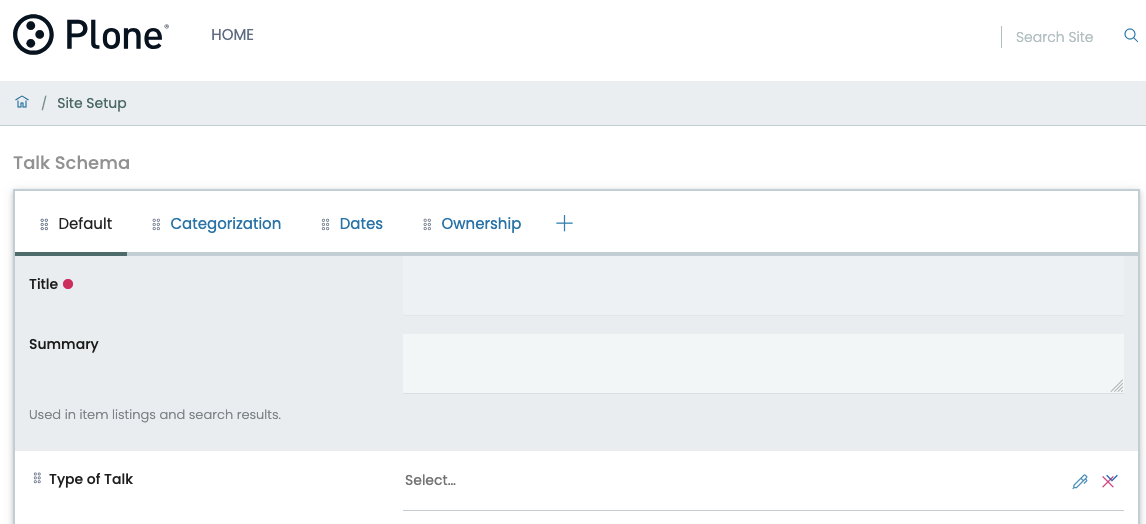
I have encountered this UI bug while trying to create a new content type, where the “dropdown arrow” is blocked by the “delete” and “edit” icons (as shown by the red box in the image). I tried searching for it’s cause in multiple files.
I found that the schema page is being rendered by DefaultView.jsx which is in src/components/theme/View/DefaultView.jsx . It calls different widgets according to the chosen field for content type. I tried modifying the SelectWidget.jsx in src/components/manage/Widgets/SelectWidget.jsx but it applies the styling to all other "select" widgets in other pages.
Is there another way to fix this issue where it doesn’t affect the global styling of the SelectWidget or any other pages? Or is it better to leave it as it is?
wait…this is in the actual Volto repo ??.
Anyway, I think the overlap comes from the edit/delete being absolutely positioned on the right in FormFieldWrapper see .ui.form toolbar in form.overrides So it covers the select’s dropdown arrow. Changing SelectWidget would affect every select. Fix it only on the schema page by adding page-scoped CSS. The schema view is wrapped in a div with id = page-controlpanel-schema. in your theme (for example extras/widgets.less) add something like:
That gives the dropdown space only on the content type schema page, without changing global SelectWidget styling. I’m not 100% sure about this approach, so please give it a try and adjust the selector and padding accordingly.
Also, I would suggest you open an issue before raising a PR for this fix.
btw I think this is not the right thread to ask this.
@Kathrina-dev btw this topic is about where to contribute. For this ui bug you should open a new thread to get the right direction. I’m not sure whether we you need to to move this from here or keep it. @stevepiercy may give confirmation on this.
In general, bugs should be reported in the GitHub repository, and especially when it's out of the box and not a customization. At the same time, after you've searched GitHub for information on the bug and come up empty, then discussing it here is perfectly acceptable.
I was able to reproduce this on the default Volto demo out of the box.
It's a UI bug. I don't know how to best to resolve it. While editing the schema of a content type, the UI should have options to drag (the six dots on the left), edit (pencil), and delete (red X), as well as all the UI features of the widget so that the editor can see the options without having to go into the field definition. I'd suggest doing this by moving the toolbar for the field into a new adjacent column, but that might be easier said than done.
Congratulations on finding a reproducible bug! @Kathrina-dev would you please open an issue in the Volto repo, checking first to see if one has already been submitted? It'd be better to have the discussion on GitHub. Thank you!
Thanks so much on your informational insights! @stevepiercy and @aryan7081 . I’ve checked if there’s any issue opened on Github on this matter and didn’t find any. I’ll open an issue and try fixing it using the methods suggested.
Respected Sir,
I’m Garima Mittal, a Computer Science engineering (CSE) undergraduate student from India . Just like Kathrina, I'm also exploring Plone for GSOC 2026. I'm new to this platform. I have hands-on-experience in MERN stack.
I would be extremely grateful if you could help me find beginner’s guide and relevant projects where I can contribute.

 ??.
??.